

An Eight Point Audit That Gets Ready for Agentic Checkout
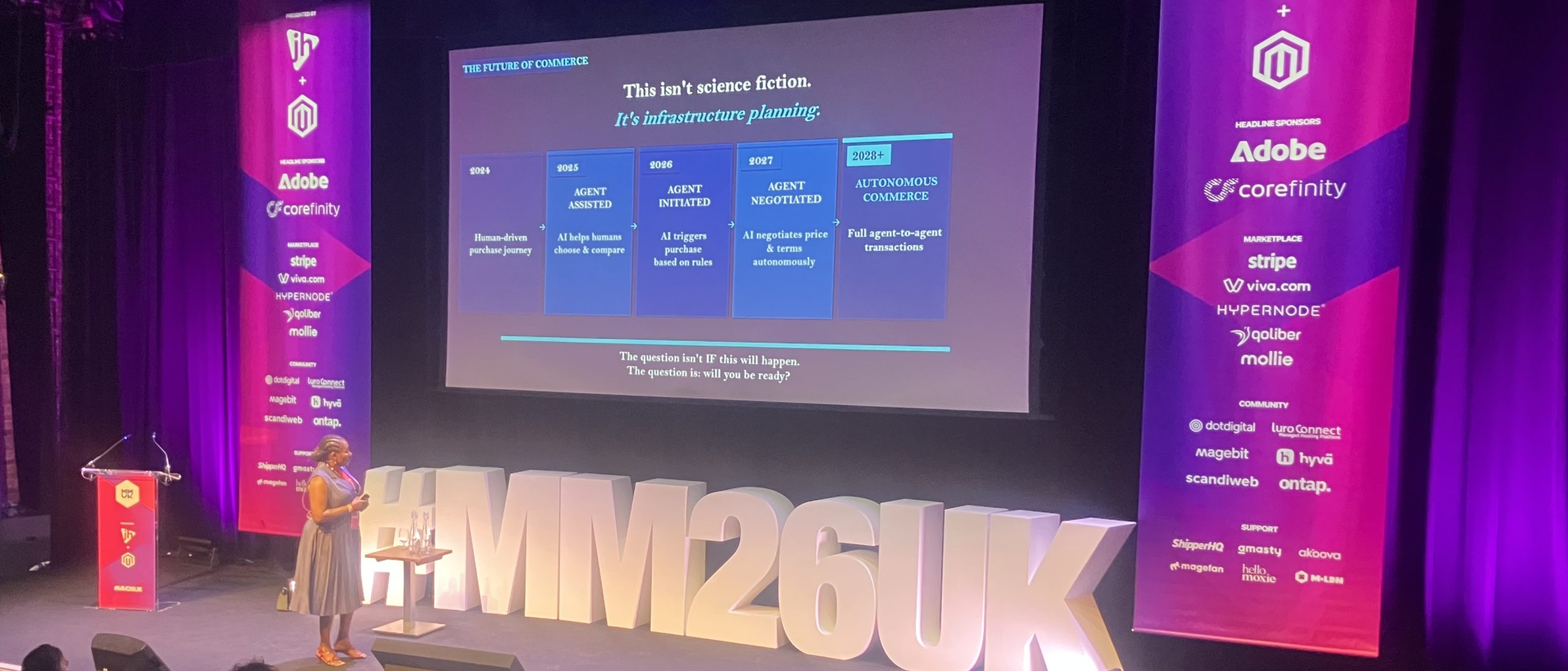
Ensuring our online store checkouts are safe and secure for customers has meant we’ve all been busily adding Captcha checks, bank app approvals, text one time passwords (OTP)… to forms that are filled in, field by field, by compliant customers. But what happens when that customer is an uncompromising AI agent, delegated to handle the complete purchase process by its human principal. That was the question addressed by Sakinah Adebola Abdul-Ibiyeye* at the recent Meet Magento 26 in London. Her conclusion: it isn’t if this will happen. The question is will you be ready? She also suggests a test that is simple, cheap, easy to apply and remarkably revealing.
The problem for AI agentic purchases is that most Commerce/Magento checkouts are not set up for agentic activity and they will fail silently when an agent tries to complete them. A human hitting a confusing form field will squint, guess, or give up and email support. An agent hitting the same field either mis-fills it, throws an exception three layers up in its own reasoning, or simply stops. Nothing lands in the error logs to tell you why. The sale is lost and no one is alerted to find out why it happened.
Sakinah Adebola Abdul-Ibiyeye, a specialist in digital payments and emerging AI-driven commerce models, has identified eight key checks that ecommerce store owners can run to ready themselves for agentic checkout. We have taken that list and dug down into the detail of how to get a Magento store ready for the coming agentic checkout.
1. Do you offer wallet-first payments?
Does the checkout offer Apple Pay, Google Pay or PayPal etc, ideally triggered via a single API call rather than a multi-step redirect.
An agent cannot type a 16-digit card number, expiry date, and CVV with any reliability, and has no card in a physical wallet to reference. A payment wallet collapses all of that into one authenticated, tokenised request that the device or account has already verified. Wallets also carry their own biometric/device-level authentication (Face ID, fingerprint, account session), which frequently satisfies Strong Customer Authentication requirements without triggering a separate challenge screen. This removes the single biggest point of failure for automated purchasing. It is also why the card networks built their agent frameworks on top of wallet-adjacent tokenisation rather than raw card entry: Mastercard’s Agent Pay and Visa’s Trusted Agent Protocol both bind a payment credential to a specific agent and merchant scope, which only works cleanly if a tokenised/wallet credential exists in the first place.
Wallets are supported by existing payment gateway extension (eg Braintree, Adyen, Stripe, Checkout.com etc) rather than as a core Magento feature. Click on Stores > Configuration > Sales > Payment Methods for a gateway’s wallet toggle. You should confirm that the wallet buttons actually render at every entry point an agent might land on (product page, mini-cart, cart page), not only on the final payment step of a multi-page checkout. Agents often try to complete a purchase through the fastest visible “Buy with Apple Pay” button rather than walking the full funnel.
For Adobe Commerce, Adobe Payments, Commerce’s own integrated payments product bundles Apple Pay and Google Pay with built-in fraud and chargeback protection and preferential rates. Magento Open Source merchants get the wallet buttons through a standard gateway extension, just without that bundled protection layer.
2. Is tokenisation enabled?
Are stored, tokenised credentials enabled that support repeat or agent-initiated purchases, not just a “remember my card” checkbox?
Tokenisation is the prerequisite for almost everything else on the agentic checkout list. An agent making a purchase “on behalf” of a customer can’t keep asking for the CVV again. It needs a durable, revocable credential that it is authorised to use within defined limits. This is precisely what the new agentic token frameworks formalise. Mastercard’s Agentic Tokens extend the Mastercard Digital Enablement Service to bind a tokenised card to a specific agent, merchant scope, and consent policy. Visa’s Trusted Agent Protocol layers a Verified Agent ID and a signed consumer-consent record on top of its existing tokenisation service. Neither works if a store still handles payments as one-off, un-vaulted card submissions.
In Magento this is handled by the Vault module, which most major gateway integrations plug into (Braintree Vault, Adyen tokenization, Stripe’s setup-for-future-usage flow).
You can confirm Vault is enabled for your active payment method in Magento admin, and check that customers actually have stored payment methods available in My Account. Also check your PCI SAQ scope hasn’t quietly expanded because of how tokens are being stored or passed.
3. Does your 3D Secure have a fallback?
Frictionless authentication should be possible for recognised agent traffic. Or at least exemption logic should be in place (low-value, transaction-risk-analysis, trusted beneficiary).
A 3DS2 challenge, the SMS one-time code or redirect into a banking app, assumes a human is holding a phone at that exact moment. An agent has no phone, no SMS inbox, and no banking app session. This can present a hard challenge that means that the transaction doesn’t just get harder, it becomes flatly impossible to complete. Fortunately, the fix is not to disable 3DS (a fraud and liability-risk decision no one should make unilaterally). Rather it is to make sure your gateway’s risk engine is actually configured to use 3DS2’s built-in risk-based authentication,. This can approve transactions frictionlessly when the risk score is low, and can use recognised exemptions rather than forcing a challenge on every transaction by default.
In Magento, check your gateway’s fraud/3DS dashboard for exemption flags and risk thresholds. As agent identity standards mature, expect to also be able to allow-list verified agent traffic carrying a Visa TAP or Mastercard Agent Pay identity signal, which should shift more of these transactions into frictionless flow.
4. Are your checkout fields consistently named?
Field names, labels, and autocomplete attributes need to be stable and semantically meaningful across guest and logged-in checkouts.
An agent doesn’t see a checkout the way a human does. It reads the DOM: element IDs, name attributes, visible labels, ARIA roles, and autocomplete tokens (first name, last name, postcode, cc-number, and so on). This is the closest thing checkout has to a machine-readable contract. If a store’s theme or a customisation renames fields dynamically or uses auto-generated IDs (field_47, txt_a3), or is inconsistent between guest and logged-in flows, an agent can mis-map data into the wrong field Or it may simply fail to find the field at all with no visible error to catch.
Ask your developers to audit the checkout template (Luma, Hyvä, or PWA Studio/headless front-end) for standard HTML autocomplete attributes on every checkout input. Be wary of custom JavaScript that re-labels or re-orders fields after page load. A human barely notices. An agent that mapped the DOM once will not re-check.
5. Is your product data machine-readable?
Structured product schema (price, availability, variant/spec data) should be in place so an agent can query directly, rather than needing to parse a rendered page.
Before an agent adds anything to a cart, it needs to confirm the product actually matches what was asked for, eg. right size, right price, in stock. I does this by querying structured data not by “reading” your product details page (PDP) the way a person scans a screen. Screen-scraping of a rendered page is fragile, slow, and against the terms of service of most agent platforms anyway. Structured schema lets an agent verify before it buys, which is exactly the trust signal that keeps it from abandoning the purchase out of uncertainty.
In Magento most themes ship this by default. But custom overrides frequently silently break it. Another job for your developers is to review completeness of GraphQL catalog data since that’s the layer agents and MCP-style integrations query directly. Neither Adobe Commerce nor Magento Open Source currently ships built-in support for the Universal Commerce Protocol feed profile yet. So to be discoverable to UCP-compliant agents specifically, find a custom module or third-party integration rather than assuming it’s covered out of the box.
6. Do you have Captcha on checkout?
Is Captcha required at checkout submission. If so, can you migrate to an alternative authenticated path for legitimate agent traffic.
Captcha exists specifically to distinguish bots from humans. So, if it’s present, agents will fail. That’s not a fraud success, it means a real customer who chose to delegate a real purchase his been blocked. The direction the industry is moving is to replace blanket Captcha with behavioural/risk-based fraud detection plus agent identity verification (Visa TAP’s Verified Agent ID, Mastercard’s agent-bound tokens). The aim is that a trusted, authenticated agent will get a defined API path instead of a visual puzzle it cannot solve.
Check Stores > Configuration > Security > Google reCAPTCHA for whether it’s enabled on the checkout/place-order form specifically (as opposed to login or contact forms, which are lower-stakes to leave protected). If needed for fraud reasons, consider swapping it for order-level fraud tooling and define a separate, authenticated API path – for example via storefront GraphQL with agent-identity headers – that verified agent traffic can use without hitting the human-facing challenge at all.
Adobe Commerce offers native Fraud Protection. Third-party tools (Signifyd, Riskified or similar) offer Magento Open Source merchants an equivalent.
7. Can your checkout flow work headlessly?
Can cart and checkout be completed entirely through the API layer, without depending on server-rendered pages or an accumulated browser cookie jar.
This is because most agents behave like API clients, not full browsers. They don’t necessarily carry a persistent, correctly-ordered cookie jar through a sequence of redirects the way a browser session does. A checkout that quietly depends on session state built up across several page loads will work fine in a demo and then break, silently, the moment an agent tries to drive it through API calls alone.
This is exactly what the GraphQL layer is for… createEmptyCart, addProductsToCart, setShippingAddressOnCart, setPaymentMethodOnCart, placeOrder … are stateless and scriptable by design. The check is rather a storefront (PWA Studio, Hyvä, or a custom headless front-end) actually routes checkout through these mutations end-to-end, or whether it quietly falls back to a monolithic, session-based controller at the payment step. Request your developer to test the cart-to-order flow directly against GraphQL, without a browser, to find out.
8. Have you tested your checkout with an AI tool?
It’s exactly what it says: a literal, manual test. Ask ChatGPT (with browsing/agent mode), Copilot, or a similar tool to visit your store, attempt a purchase and see what happens.
All the other points are theoretical checks. This is the practical one. It’s also the only step that reliably reveals silent failures, indicating the exact field, button, or redirect where an agent gets stuck or gives up. These failure cases won’t show up in server logs as errors. It’s the cheapest test on this list, the simplest and the one most likely to catch something the previous seven missed.
In Adobe Commerce: Re-run this test after addressing each of the earlier points, and keep a running log of exactly where the agent stalled — which step, which field, which button — as your own internal agent-readiness regression suite. Treat it the same way you’d treat cross-browser QA: not a one-off, but a check you repeat whenever checkout changes.
Quick-reference checklist
# | Check | Owner |
1 | Wallet-first payments (Apple Pay / Google Pay / PayPal) live at every entry point | Payments / gateway config |
2 | Tokenisation (Vault) enabled and stored payment methods working | Payments / gateway config |
3 | 3DS risk engine allows frictionless auth or valid exemptions | Payments / PSP |
4 | Checkout fields use consistent, semantic naming and autocomplete attributes | Frontend / theme |
5 | Product schema (JSON-LD, GraphQL catalog) accurate and complete | Catalog / frontend |
6 | Captcha removed from checkout, or an authenticated agent path exists | Security / fraud |
7 | Cart-to-order flow completable end-to-end via GraphQL, no session dependency | Architecture / headless |
8 | Checkout tested live with an AI agent, failure points logged | QA |